 Daily Updates with RF Rizwan Farrukh

http://wordpress.org/plugins/sem-external-links/
There is a huge difference when it comes to external and internal links, when using WordPress. The plugin for external links allows you to process outgoing links differently to the way of internal links.
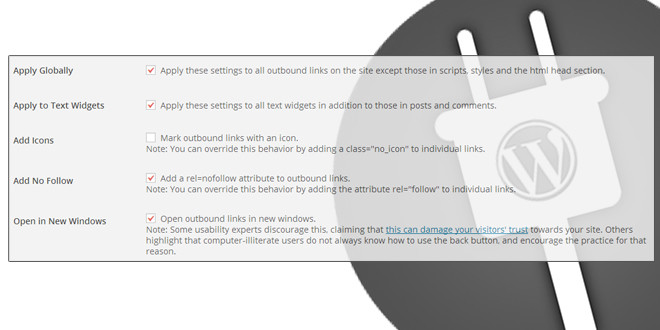
Simply click Settings, and under this you will find External Links, and this is what you can organize the plugin to:
- Develop all outgoing links, rather than just those within your entries content and text widgets.
- Add an external link icon to outgoing links. In order to override this, you can use an attribute on links.
- Add ‘rel=nofollow’ to the links. You can use a rel=“follow” attribute on links to override this.
- Open outgoing links in new windows. However, also keep in mind that this can damage your visitor’s trust towards your site as they can think your site used a pop-under.