 Daily Updates with RF Rizwan Farrukh

Read on to discover how to set-up and use Google Now. It is Android’s voice-driven personal assistant and Google’s answer to Apple’s Siri.
After the release of the Moto X, Nexus and Android 4.4, Google Now has become one useful tool.
Below is the method on how to set up Google Now and how it can make your Android experience hands-free.
Androids answer to Siri is Google Now. It uses a natural language interface to answer questions and a unique card system to offer information related to your search history; just like an intelligent personal assistant!
It first appeared in Android 4.1, but recently it has become a really useful tool.
Google Now offers even more features than before and these are only available in Android 4.4, Nexus and Moto X.
Google Now allows you to get quick access to information based on your location and search history. In order to access Google Now, all you do is long-press the home button and swipe up. Cards that are specific to your usage and location will now appear.
You are able to both add cards and customize the types by pressing the Wand button and then pressing the card you wish to customize.
After you have read a card, you can always get rid of it by swiping to the right.
Google Now gives you much more than just a card system and this is what:
– You can get directions
– You can ask questions
– You can call a contact
Set Up
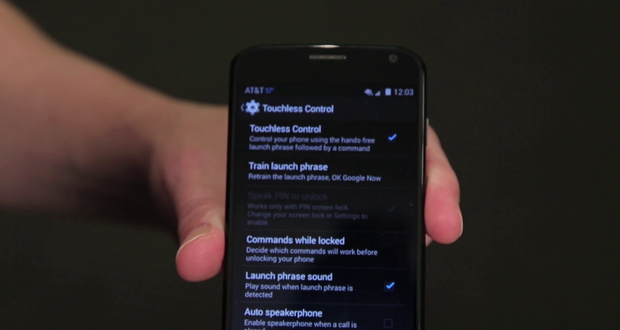
If you are using Moto X, you simply go to Settings, Touchless Controls and you need to ensure Touchless Controls is enabled.
You also need to train the launch phrase so the system gets better at recognizing your voice. This is achievable from Touchless Controls Settings. Simply click on Train launch phrase and speak at the given prompt.
This needs to be done in silent room.
That’s it, now you’re ready to start using Google Now!